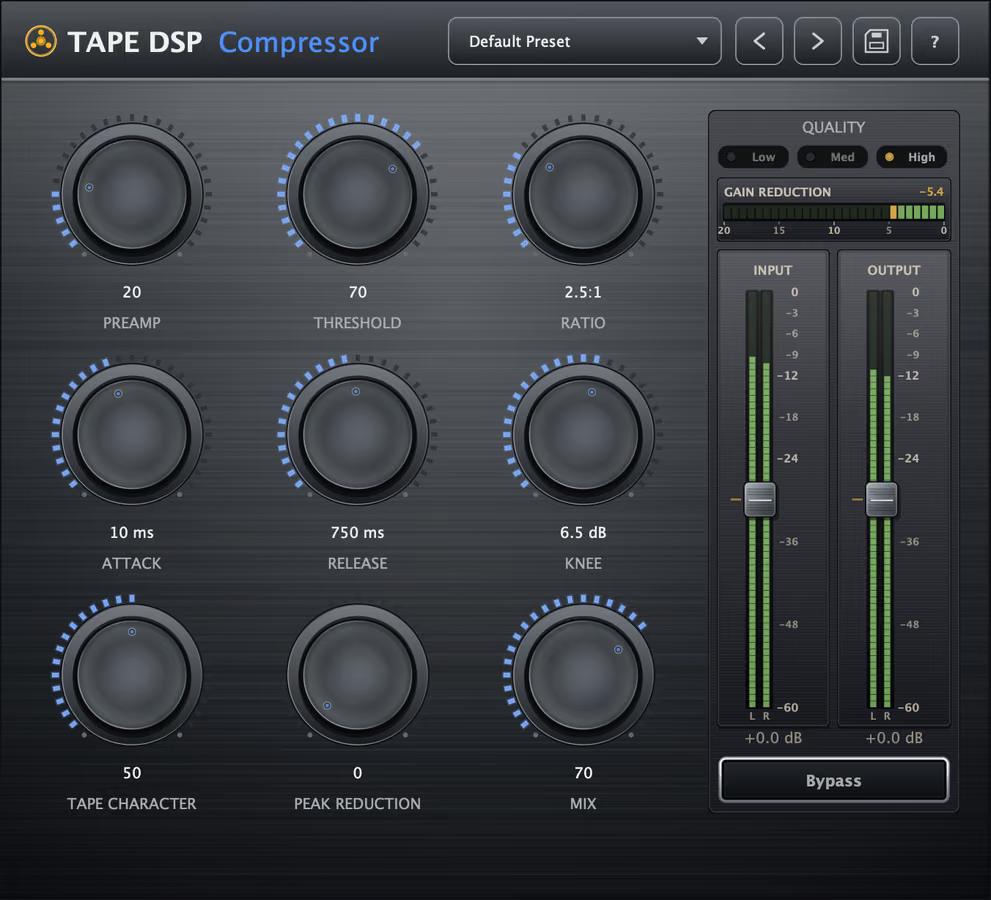
Tape Compressor is a free-to-run tape-style channel compressor for VST3, AU and LV2 on Windows, macOS and Linux. The full compressor (Threshold, Ratio, Attack, Release, Knee and Mix) is free, and a one-time Expansion adds Preamp, Tape Character and Peak Reduction. It installs with the rest of the plugin pack.
What is a tape-style compressor?
Tape Compressor leans into the way tape and analog electronics control level: soft, program-dependent gain reduction plus harmonic saturation. You get the cohesion of compression and the tone of tape in one stage. It pairs naturally with tape saturation — background in what tape does in mastering.
What do the controls do?
- Threshold — how loud the signal must get before the compressor starts working.
- Ratio — sets how firmly peaks are held, from gentle leveling to strong control.
- Attack — how quickly gain reduction grabs after a peak.
- Release — how quickly the compressor lets go.
- Knee — softens the transition into compression so it can stay musical.
- Mix — parallel blend of dry and compressed for punch with control.
- Preamp (Expansion) — a tube/transformer input for weight and color feeding the compressor.
- Tape Character (Expansion) — tape formulation and colour behind the leveling.
- Peak Reduction (Expansion) — FET bite after the optical stage, for extra punch and peak control.
The built-in gain-reduction meter shows exactly how hard it is working so you can dial in glue by eye and ear.
How do I use it for glue and weight?
On a drum or mix bus, start with a moderate Ratio, lower Threshold until the mix breathes as one, and set Attack slower for glue or faster for punch. Use Mix to blend back transients if it gets too controlled. On vocals or bass, a little Preamp (Expansion) adds density before the leveler even engages. To avoid over-compressing, watch the gain-reduction meter and A/B at matched level, like in using tape on the master bus.
What does a tape compressor add to a channel?
A tape-style channel adds character while it controls dynamics, so tracks sit together with analog warmth. The leveler itself is free for home studio setups, and it stacks with Machine's saturation and Echo's movement.
Also available online
Tape Compressor is a complete DAW plugin. When the song is finished, Tape Mastering masters it through tape in the browser.
When the song is done, Tape Mastering masters it through tape for the streaming platforms.
Hear the character, then download
Download the plugins for your DAW, or compare the homepage samples.
FAQ
Is Tape Compressor free?
It installs and compresses for free: Threshold, Ratio, Attack, Release, Knee and Mix are always available. Preamp, Tape Character and Peak Reduction are part of the Expansion, a one-time purchase. Activate once with a Tape DSP account; there is no subscription.
What formats does it support?
VST3, Audio Unit (AU) and LV2 on Windows, macOS and Linux.
What does Peak Reduction do?
Peak Reduction is a FET stage after the optical compressor. It adds faster, punchier peak control on top of the opto. It is part of the Expansion.
Can I use it on a mix bus?
Yes. Use a moderate ratio, a musical Threshold and the parallel Mix control for transparent glue, or push it for obvious tape-style dynamics on individual tracks.
The plugins never use credits. When the song is finished, Tape Mastering masters it through tape for streaming, and new accounts get starter credits.
Get the plugin pack
Download the plugin pack. Open Tape Mastering when a song is done and you want a master through tape.