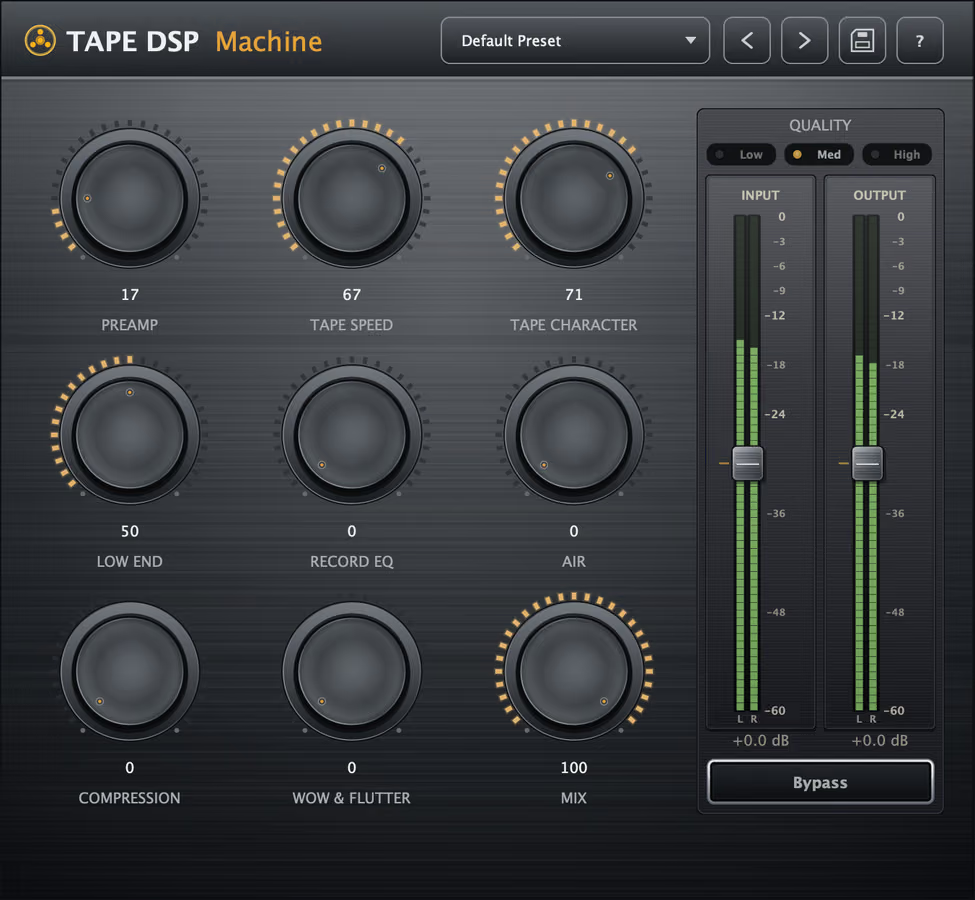
Tape Machine is a tape saturation plugin for VST3, Audio Unit (AU) and LV2 on Windows, macOS and Linux. Drop it on a track or bus for analog warmth, harmonic density, gentle glue, and that printed-through-tape feel. It comes in the plugin pack: download it, then activate once with your Tape DSP account.
What is Tape Machine?
Machine is a physically modeled reel-to-reel tape processor. It models the behaviors that make real tape musical: a tube/transformer input stage, magnetic saturation, speed-dependent head bump and bandwidth, high-frequency loss, gentle tape compression, and a touch of movement. New to the idea? Start with what tape saturation is and what it does in mastering.
What do the controls do?
- Preamp — drives a tube/transformer front end for weight and harmonic color before the tape stage.
- Tape Speed — sets the machine's character: slower speeds add low-end head bump and warmth, faster speeds sound tighter and more extended. See 15 IPS vs 30 IPS and tape head bump.
- Tape Character: chooses the tape formulation and how hard it colors, from clean and open to rich and worn.
- Low End — keeps the bottom tight so tape weight does not turn muddy.
- Wow & Flutter — adds subtle pitch movement for organic, analog instability.
- Record EQ — shapes the signal into tape the way a real record chain would (Expansion).
- Air — restores or shapes the top end so tape smoothing never turns dull (Expansion). More on that in using tape without dulling the mix.
- Compression — signal-dependent tape compression for glue and density (Expansion).
How do I use it in a mix?
On individual tracks, use light Preamp and Character to thicken vocals, warm up DI bass, or ease the digital edge off drums. On a mix or master bus, keep it quiet: a speed that supports the low end, and Expansion Air if the top closes. Compare at matched level. Safe defaults: best starting settings.
What is free, and what is Expansion?
Preamp, Tape Speed, Tape Character, Low End, Wow & Flutter and Mix are free. Record EQ, Air and Compression are part of the Expansion, a one-time purchase. Built for a home studio that wants real tape character in software — more in tape machine vs tape plugin. The other plugins in the pack install and run the same way.
Do I need Tape Mastering as well?
Tape Machine is a complete DAW plugin for tracks, buses and the mix bus. When the song is finished, Tape Mastering masters it through tape in the browser. Guides for other plugins in the pack: Tape Compressor and Tape Echo.
When the song is done, Tape Mastering masters it through tape for the streaming platforms.
Hear the character, then download
Download the plugins for your DAW, or compare the homepage samples.
FAQ
Is Tape Machine free?
Preamp, Tape Speed, Tape Character, Low End, Wow & Flutter and Mix are free. Record EQ, Air and Compression are part of the Expansion, a one-time purchase. Activate once with a Tape DSP account, with no subscription.
What formats and operating systems does it support?
Machine installs as VST3, Audio Unit (AU) and LV2, and runs on Windows, macOS and Linux inside any compatible DAW.
Do I need Tape Mastering as well?
Tape Machine is a complete DAW plugin for every track. Tape Mastering is for the finished song: it masters the whole mix through tape in the browser.
What can I use it on?
Anything — vocals, drums, bass, synths, buses and full mixes. Use it lightly on a master bus for glue, or push it harder on single tracks for obvious analog color.
The plugins never use credits. When the song is finished, Tape Mastering masters it through tape for streaming, and new accounts get starter credits.
Get the plugin pack
Download the plugin pack. Open Tape Mastering when a song is done and you want a master through tape.